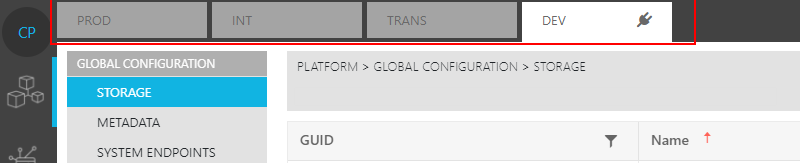
By default, ConfigPortal provides four, predefined Staging Environments. These are defined as such:
Productive (PROD):
-
The actual live system used for media production by a customer.
-
It is often used 24/7 for production and it is considered risky to effectuate changes in a live system.
Integration (INT):
-
Test system in the customer's infrastructure / network.
-
Used for testing by the customer and for acknowledging updates for going live in the PROD Environment.
-
Testing in a customer's infrastructure with the correct version of 3rd party components.
-
This Environment is use mainly by the customer's administrators or key users.
Transition (TRANS):
-
The test system in the Viddis S4M network
-
Used for preconfiguring systems and testing system changes or extension projects
-
Used for analyzing errors from the support and project team independently from the customer Environments.
-
S4M engineers use this Environment mainly to try out and test configurations and updates.
-
Used for debugging problems reported from the PROD or INT Stages.
Development (DEV):
-
The test system in the Vidispine S4M network
-
Used for developing specific systems, try outs and testing in a development Environment
-
Used for debugging problems reported in the PROD that require debugging
-
Used mainly by the Vidispine S4M development team.
These are the Stages that can be seen in ConfigPortal's UI at the top as tabs. Users are able to select a particular Stage to see the latest configuration status stored in the ConfigPortal data store.
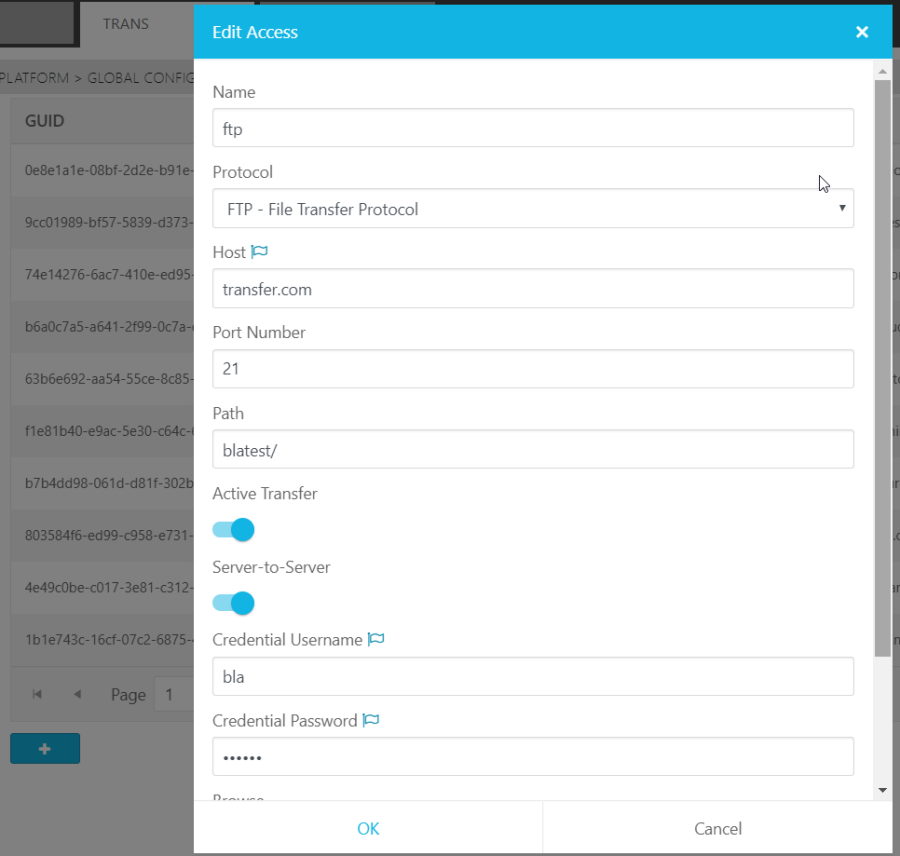
The UI also indicates if a parameter is Staging dependent or not.
Staging dependent parameter:
-
Are marked with a "Flag" icon in the UI, as seen with the "Status" and "Vidispine Id" parameters.
-
Where the parameter values may differ between Stages.
-
Usually data related to the infrastructure such as: IP addresses, credentials, hostnames as examples.
Staging independent parameters:
-
Have no marker inside the UI as this is the expected behavior of a configuration
-
Cannot differ between Stages when the Staging process was executed
-
Usually functional configuration of system behavior such as timeouts, SW modes, presets
The example below illustrates an example in which the name and protocol of a storage access are marked as not Staging dependent while parameters like hostname, username and password are handled as Staging d dependent.