
VidiCore Product Overview
VidiNet Advanced Media Management
Solutions for Media and Entertainment, as well as Broadcast, unite under the brand Vidispine. Vidispine provides a robust portfolio housing applications tailored to create, produce, prepare, manage, and monetize media. These solutions are further enriched by a broad range of smoothly integrated applications from our partners.
VidiNet, as a part of Vidispine, draws on decades of experience in developing and deploying media management solutions worldwide our solutions cover a broad spectrum of functional blocks required to meet the demands of tomorrow’s Media Asset Management environment, today. Each individual product’s architecture is built-on the latest technology and trends, and is geared towards maximizing the efficiency of day-to-day workflows.
VidiNet Services
Vidispine Services are at the foundation of our media management solutions, providing a robust basis for a modern MAM system and Media Supply Chain.
VidiCore - A cutting-edge media management back-end that forms the foundation for your media infrastructure.
VidiCoder - A state of the art media transcoder and processing engine
VidiStream – Our unique streaming engine that enables distributed working.
Cognitive Services – An intelligence layer for integrating artificial intelligence, intelligently
VidiNet Applications
VidiNet applications provide versatile web-based frontends that handle all the technical complexity in the background, so users can focus on the task at hand, be that finding clips, annotating shots or editing media together.
VidiControl – Orchestrating the ingest of feeds and streams.
MediaPortal – The hub for finding, viewing, collecting and sharing content.
VidiEditor – Fast & flexible, browser-based editing.
VidiFlow – Workflow orchestration and content management.
Every organization faces its own set of challenges. Every organization deserves its own set of solutions. With the Vidispine portfolio, media organizations are given the freedom to choose products individually or combine and scale them to measure. Our solutions can also be tailored to their unique requirements, ensuring that organizations are able to differentiate their offering in an increasingly competitive video economy.
Benefits
Deploy and scale functional blocks independently. Automate execution of business processes.
Access media during encoding, recording and transfer for fast turnaround workflows. Exploit SOA-based infrastructure with web services allow integration of third-party systems. Deliver your assets to linear and non-linear platforms.
Access your media, any time, from anywhere with intuitive web-based user clients.
Introducing VidiCore
VidiCore is a Media Management backend service that sees its placement in the base of layer a media supply system. As implied, at the core of your system, its essential role is to handle, and ultimately reduce, the complexity of connecting multiple sources as well as the harvesting and management of media assets and their respective metadata. Coupled together with VidiCoder, VidiCore is able to provide media awareness and proxy generation right out of the box.
Another aspect which grants VidiCore a high degree of flexibility is the fact that it is a REST API service. This enables one to easily develop custom solutions on top of it. VidiCore malleable nature allows one to fit it into various application scenarios: From filling a gap in your existing media workflow, to building sophisticated media management solutions.
VidiCore’s architecture is kept simple. It can easily be deployed on an on-prem, or in cloud environment as well as utilizing vendor specify components for easy operation and scalability.
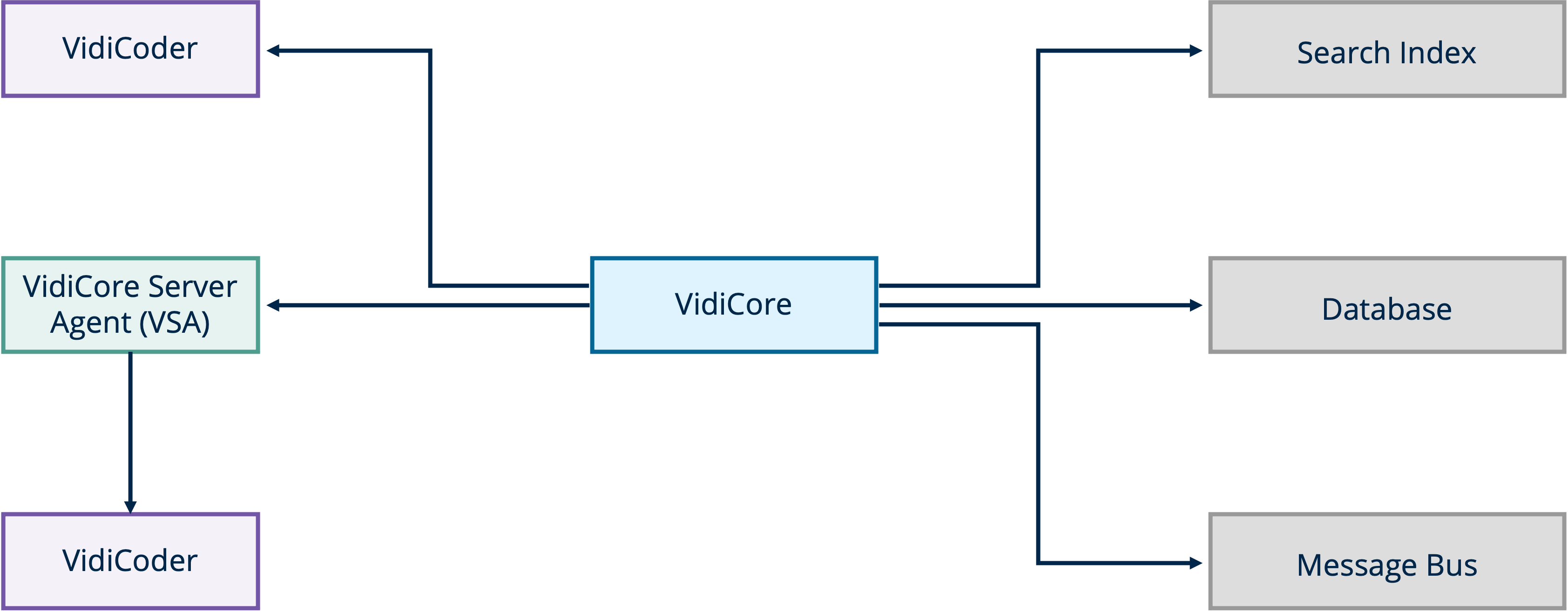
VidiCore overview diagram
Key Benefits:
Straightforward data model tailored for managing media assets.
Works with many types of storage: local, network, cloud or archive storages.
Supports multiple ingest methods: direct upload, from an URL or watch-folder ingest.
Offers a highly flexible metadata model that can be easily adjusted to capture information from various sources.
Powerful searching capability built on top of blazing fast open-source search engine.
Built-in notification system that supports different types of event receiver.
Detailed metric can be exposed to gain better insight on the status of the system.
Please note that VidiCore is available as SaaS on VidiNet and On-Prem/Hybrid context.
Features
Data Model
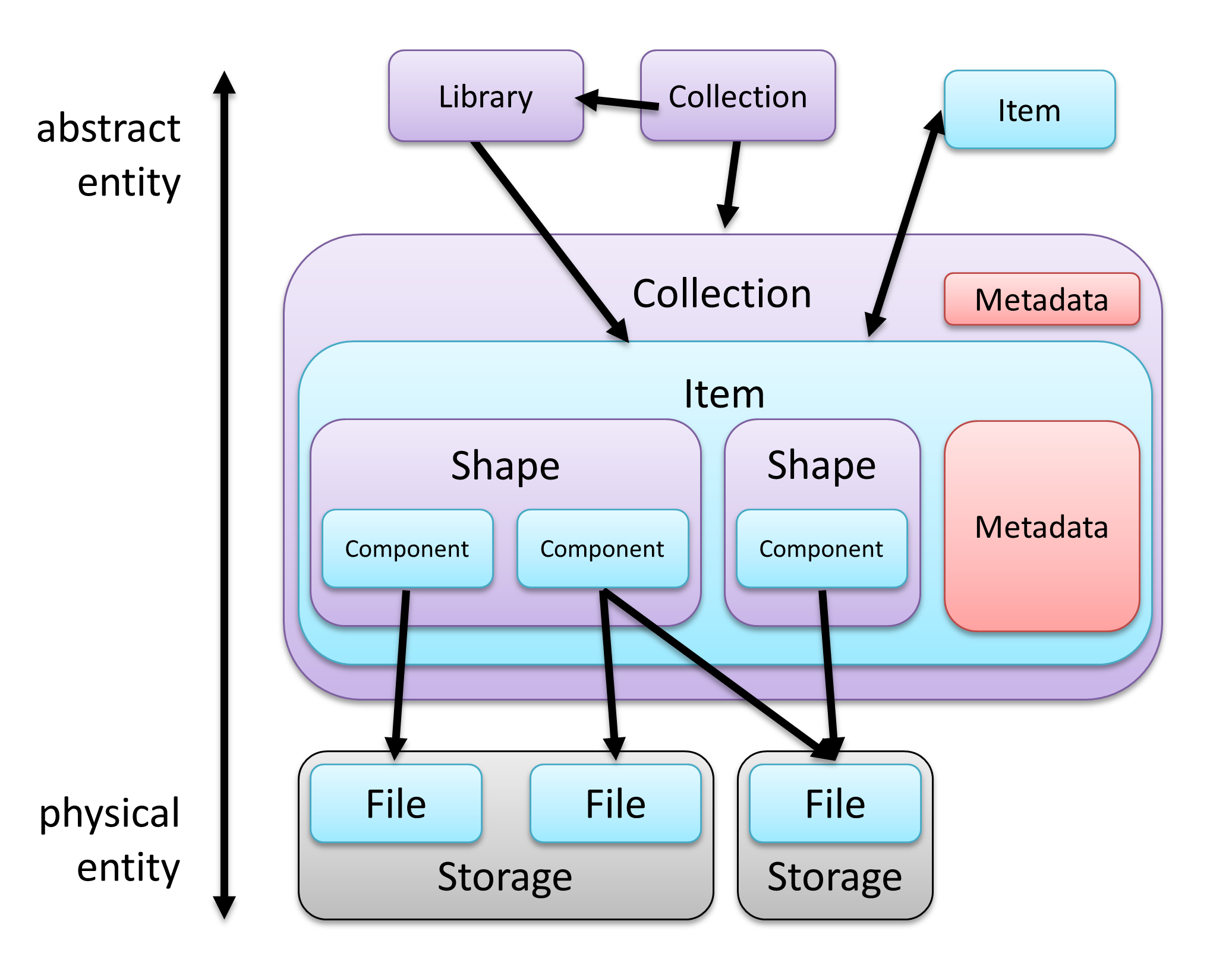
The key to understanding the wealth of benefits that come with VidiCore’s API is to understand the concept behind its data model. The breadth of complexity is condensed in a streamlined and logical arrangement relationships between the various entities and elements that make up VidiCore’s data model. These are depicted in the following diagram:
VidiCore data model
Item: The item is the central piece of this data model. It is an abstraction of the physical content and holds information about the content (like metadata, physical renditions, etc). It corresponds to an asset in other systems.
Shape: A shape is a physical rendition of an item. For example, a video asset could be transcoded to different formats or resolutions. And they are all represented as a shape. Inside a shape, there are typically one or multiple components, like video component, audio component, etc., which corresponds to video streams, sounds tracks, etc.
Component: A component typically contains an asset’s technical details (like resolution, frame rate) of as well as having a direct link to a file on the storage.
Library: A library contains a list of items which can either be added to a library manually or by using a search query. A library can also be configured as "auto-updating". This means an item can be added or removed automatically if the item metadata has changed. In this mode, library acts like a "smart folder".
Collection: A collection contains a list of items, libraries, and sub-collections, and whose entities can be ordered. Like item, a collection also has metadata, and the collection metadata can be inherited by the items inside it.
Metadata
Another key aspect for understanding how metadata works in VidiCore is the three types it can be divided into. These are timecode metadata, key-value metadata, and bulky metadata.
Timecode: Timecode metadata in VidiCore contains different values belonging to a defined set of metadata fields or groups, with a start and end time code attached to it:
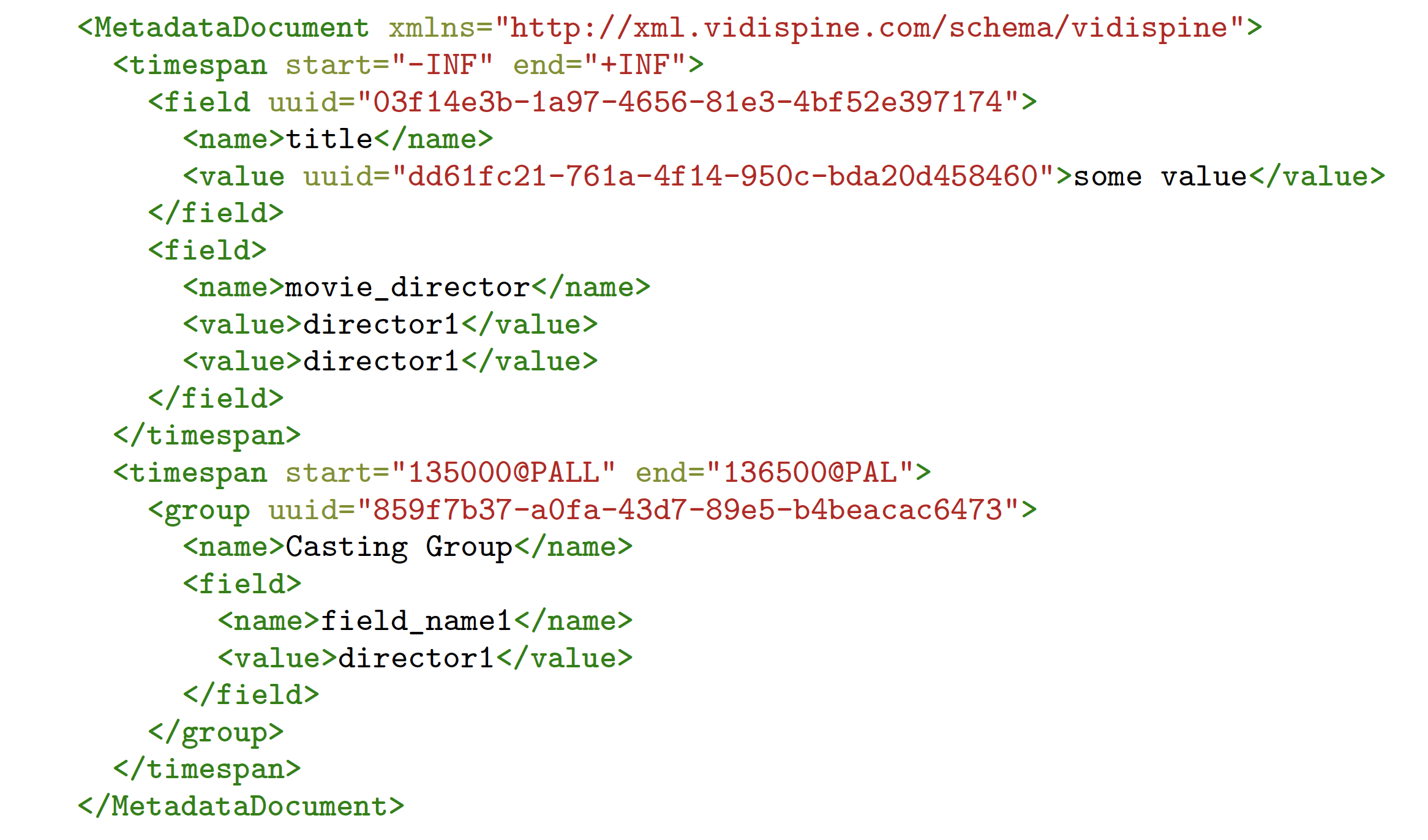
It is important to note that the metadata scheme for timecode must be defined prior to it being used.
Timecode metadata can exist globally, as "global metadata" or "document metadata", or be added to an item or a collection (as shown in the data model diagram). The fields and values inside a timecode metadata can be validated, inherited, and referenced with it supported in most of VidiCore’s search features.
VidiCore also tracks the history of a timecode metadata, so that users can easily "undo" a changes.There are also features that can help users detect conflicting metadata updates, if, for example, there are multiple users editing the same metadata instance.
Key-Value: Key-value metadata is arbitrary key-value pairs that can be attached to a shape or components. They are also searchable.
Bulky: An item or a shape can also have "bulky metadata", which is non-searchable "timecoded key-value". They are typically used as a "buffer area" for information coming from third-party services.
Metadata Import and Extraction
Subtitles: Third party metadata format, like subtitles can be imported into VidiCore via sidecar import. These are then subsequently parsed and applied to the item as timecode metadata.The subtitle formats currently supported by VidiCore are STL (EBU-STL), SRT, SCC, and TTML.
Metadata Projection: Via metadata projection, which is XSLT transformation configured in VidiCore , user can import third-party xml files that are not natively recognized by VidiCore.
XMP and IPTC: VidiCore can automatically extract XMP as timecode metadata on the item and IPTC metadata as key-value on the shape during asset import.
EIDR: VidiCore is also able to fetch EIDR metadata from the EIDR API to an item metadata.
Metadata Validation
VidiCore also allows for timecode metadata fields to be configured so that these validate against a dataset. This is an RDF document configured in VidiCore. This can be particularly useful if the field values within a metadata document need to have a specific relationship/restriction with each other. For example:
If the “country” field is set to “UK”, the “city” field cannot be “New York”
Or query a list of allowed values for the “city” field, with the constraint of “country=UK”
Search
VidiCore’s data model offers a broad palette of advantages, not only when it comes to structuring data, but also when providing effective instruments with which to search and find data.
Keyword Search: Values can be searched on one or more specific metadata fields. These can be combined with AND/OR/NOT.
Search on any Metadata Value: Search for values across all metadata fields.
Sorting: Sort the result based on certain metadata fields.
Highlighting: Highlights the fragments of metadata that match the user’s query.
Autocompletion: Building block for implementing “suggestion while typing” functionality.
Spell checking: Building block for implementing functions like automatically correcting typos.
Search Boost: Can be used to influence the ranking of item or collections.
Collection, Item, Shape and File Joint Search: Used for finding certain entities based on some other entity type’s criteria.
Storages
Supports
VidiCore supports reading and writing for an amplitude of storages. These include local storages and network locations like local path, FTP/SFTP, webdav and SMB/cifs as well as cloud storages such as AWS S3, Azure Blob and Google Cloud storage. VidiCore also supports a variety of third-party storage vendors, including archive storages. For more information on which of these are supported, please contact Vidispine.
Rule-Based Storage Management
VidiCore offers users the possibility to define storage rules. These can then be used to control the underlying file location of an item. File will be move/copy to designated storages or storage groups based on defined rules. The storage rule can be applied to all items within a collection, or library, or a single item. It can also be applied based on proxy types.
Ingesting in VidiCore
When ingesting files into VidiCore, users are given the opportunity to either directly send their’s to VidiCore or provide VidiCore with a URL or even setup a "watch folder" for auto-ingesting.
Live Ingest: Growing files are supported. Please note that this requires VSA and a non-object storage plus stream capture software (either baseband or RTMP).
File format: With the help of VidoCoder, VidiCore understands most of the media file formats. Other files can still be imported, but they will appear as a binary component without any technical metadata
Proxy: Media files can be transcoded into multiple formats. Customers can decide what "proxy" settings they would like to use from the predefined tags. Customers also have the possibility of defining their own.
Proxy / Preview on non-video assets (images, audio, pdfs): Proxy files can also be attached via the API as there is no hard requirement to use the Vidispine transcoder.
Asset Versioning: Shapes can have incrementing "essence versions" which will point to different physical files as the item has new versions generated.
User Groups and ACL, LDAP Support
Resource access within VidiCore can be limited to the endpoint level and entity level, with VidiCore API endpoints supporting a fine-grained role-based access. Additionally, access controls can be applied on various entities, including: Collection, Library, item, and metadata fields.
Users and Groups can be created using the API or synced from a LDAP server at a regular interval. User authentication can also be optionally performed against a LDAP server.
Role Model
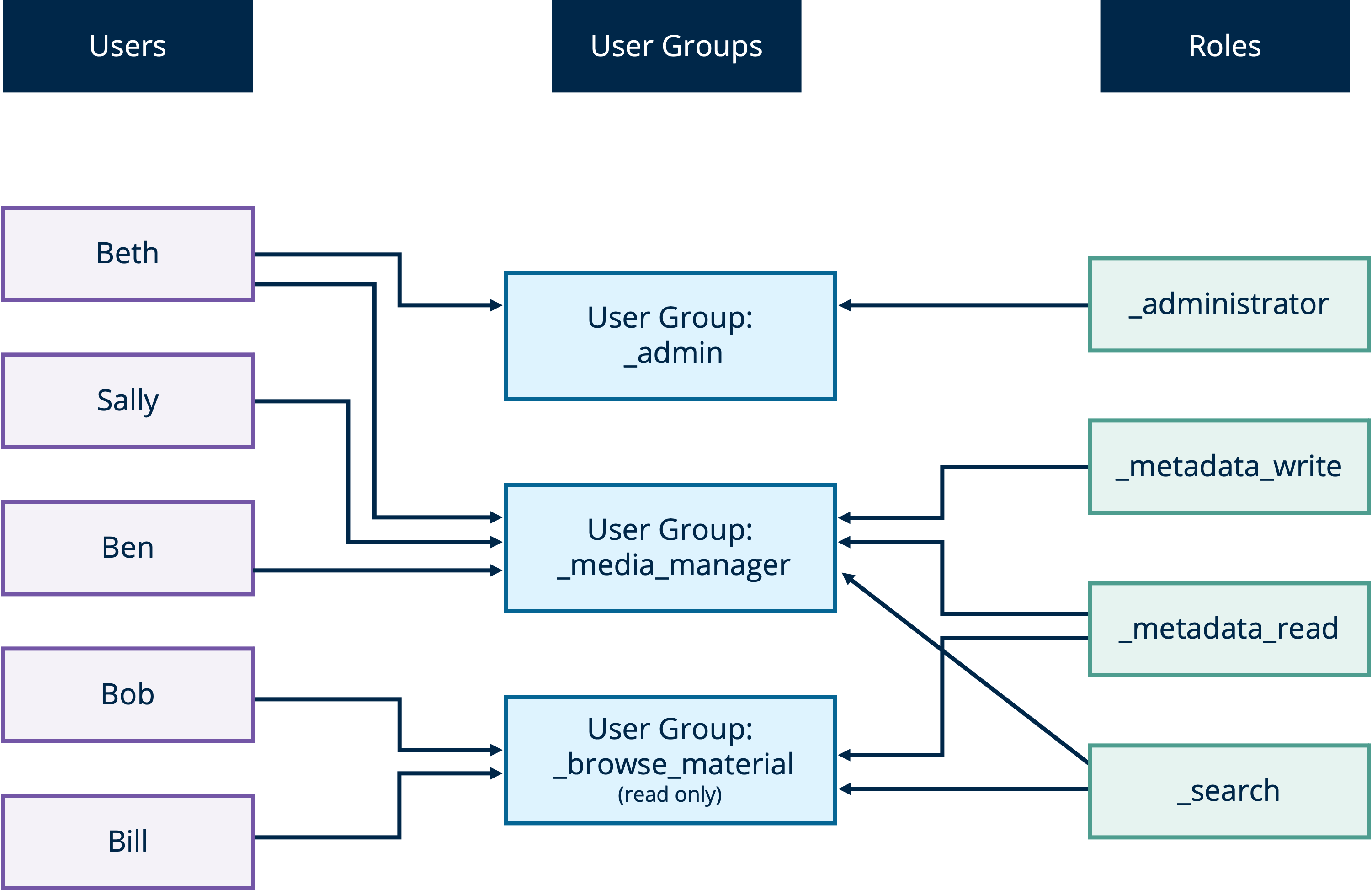
Each functional role represents the ability to perform a function are assigned to a user group. This implies that all individual users assigned to a group which contains that role, inherently have those functions.
Roles in VidiCore are implemented as special user groups. These "role groups" are system defined and cannot be changed or deleted. Similar to the "permission inheritance" between user and group, or child and parent groups, children of a "role groups" will get the corresponding permission to access an API endpoint.
For example, adding user Bob to the “_search” role groups would give Bob to access the search endpoint. But whether he can find any entity from the search endpoint depends on if he has permission (Access Control) to access the entity.
Exporting and Sharing Assets
Users can generate a time-limited temporary URL from VidiCore, or a pre-signed URL coming from a supported object storage backend (S3, Azure blob), for sharing files. Files within an item or shape can be exported to an external location with the possibility of item metadata also being exported at the same time. The file can be transcoded to a different proxy format for export. Partial file export is also supported, by specifying a start and end time code.
Notification
VidiCore has a built-in Notification system which can send out various events to configured external receivers. There is a wide range of events that are supported, like job state changes, different entities, and metadata CRUD events etc. Many event receivers are supported as well, such as HTTP endpoints, JMS, Amazon SQS/SNS. Users are also able to bring their own Java Class as the receiver to do custom handling of the events.
Metrics and Monitoring
Metrics are essential when monitoring your system, offering valuable insight into its performance. VidiCore facilitates this by exposing a variety of metrics and traces of its internal components. These metrics can then be configured to be sent to a StatsD server or exposed via JMX. VidiCore also supports Elastic APM as the application performance monitoring backend, for the improved tracking of application performance.
Service Integration Potential via VidiNet
Vast integration potential with a multitude of cloud services and media products.
VidiCore allows for a wide variety of potential integrations. These include QC, transcoder, and AI services from different service providers for VidiCore users on the VidiNet platform.
Please note that the integrations with cloud services and media products mentioned here are optional and acquired separately.
Baton QC
The possibility of integrating auto QC is available on VidiNet by using Interra Baton as a cost per content minute. The results of which are stored as both bulky metadata in VidiCore.
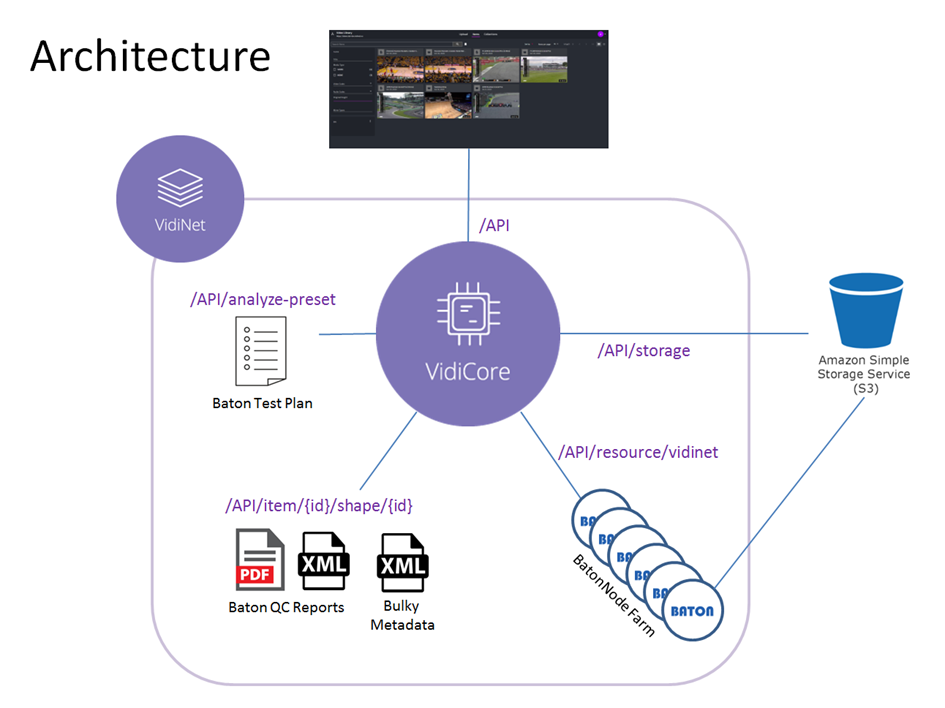
Architecture diagram with Baton QC
Transcoders
While VidiCore does come with its own built-in transcoder, VidiCoder (which implements several codecs), additional transcoding services are available on VidiNet: AWS Elemental Media Convert, Bitmovin and Cinnafilm Tachyon.
AI Services
Through the VidiNet platform, VidiCore is given the choice and access to a range of services designed to more intelligently find relevance in your data. Cognitive services analyze and carry new information in the form of metadata which gives your MAM system new and much more granular methods of managing your media files. The analysis types can be grouped by use case, such as speech-to-text or face and object detection. These in turn being powered by individual 3rd party services such as the ones below:
Amazon Rekognition
Amazon Transcribe
DeepVA Face Extraction
DeepVA Face Training and Analysis
Watermarks
Image and text overlays can be configured in the transcode profile. Dynamic overlays can be configured when transcoding media as a "sequence".
Using JavaScript
VidiCore users may want to extend their capabilities within many areas in their system. This can be done with JavaScript for the following use cases:
Defining the file names imported file name dynamically based on metadata
Choosing proxy formats dynamically based on metadata
Adding extra job steps to various pre-defined job types
Defining custom jobs
Process notifications.
Deployment
There are DEB and RPM packages available for VidiCore and VSA, so they can be installed to supported system, or containerized easily.
VidiCore Server Agent (VSA)
VidiCore users can choose to install a VidiCore Server Agent (VSA) on different worker nodes. VSAs serve to communicate with the central VidiCore server securely, performing various resource intensive activities like storage scanning, file hashing, file transfer and transcoding, etc.
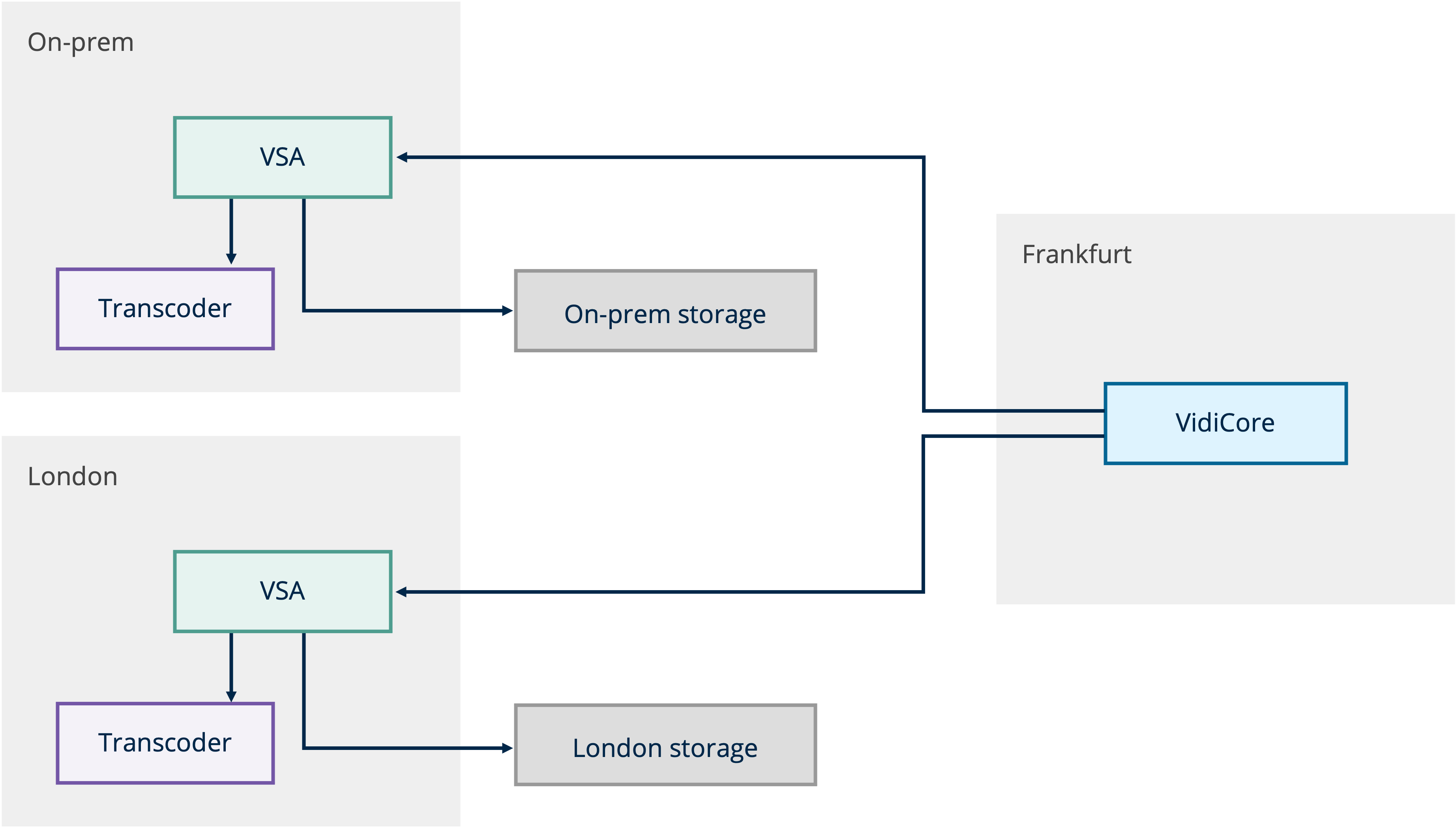
VSA overview diagram
Users can choose to deploy VSA, which would perform most of the resource demanding jobs, close to the storage that it's managing for the optimal performance. While the VidiCore API server can be deployed "at a distance" that is closer to the API clients/consumers.
Multiple VSAs can also be configured to manage the same storage location, which adds redundancy to the storage management.
VidiCore through VidiNet: SaaS
VidiCore API server can be deployed on VidiNet as a managed service. There are two types of deployments that can be chosen on VidiNet: Started Edition and Team Edition.
Starter Edition is the perfect choice for smaller media supply chain projects, as well as development projects, proof-of-concepts, testing new API features, and explorative activities.
Team Edition is intended for production systems. All system components are configured in redundant failover clusters and powered by performant servers.
As a whole, VidiCore systems on VidiNet have the same capability as the on-prem ones. However, due to various limitations operating inside a cloud environment and security reasons, customers will have limited functionality within some areas of VidiCore:
Users cannot interact with the operation system directly, or use the Java interoperability within the GraalVM javascript engine, meaning the Javascript feature in VidiCore will be limited.
Only cloud storages are supported.
Certain notification receivers like JMS receiver and custom Java receiver will not work.
Users are not able to do advance customization on the search engine.
In the meantime, VidiCore SaaS users on VidiNet will get some exclusive integration with QC, transcoder, and AI services from different service providers.