
This section illustrates how VidiEditor projects are persisted in VidiCore, how they are versioned, and how timelines are related to them. It also explains how metadata and locks are persisted and inherited as well as what happens during the publishing process.
VidiEditor Project Data Model:
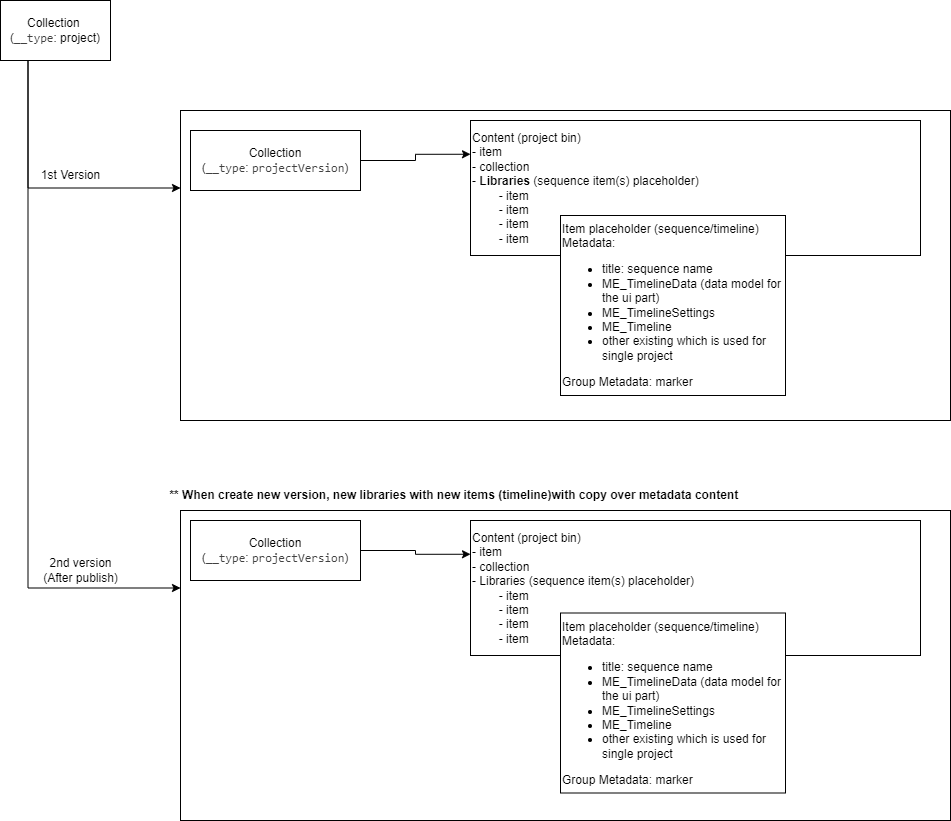
VidiEditor’s data model
The steps can briefly be summarized as such:
-
Create Project
-
VidiEditor creates a collection acting as project parent element
-
This holds a sub collection used for versioning the different status of edit and publish steps
-
Each Version/sub-collection will hold a library which use to keep track the timeline (store as an item)
-
The project can hold metadata entered by VidiEditor or entered by the user in the VidiEditor frontend
-
If deletion locks are used those are set on project creation
-
-
Add items to VE project
-
This references used media to the project collections when adding media to timeline or project bin
-
If deletion locks are used those get inherited for the used media
-
-
Work in timeline
-
Each timeline in Vidicore have their own respective item, which the timeline information is persisted in the item as metadata “ME_Timeline“ and “ME_SequenceDocument“ on every change in timeline.
-
Start time code and aspect ratio will store in metadata “ME_TimelineSettings”
-
-
Publish
-
A new item is generated
-
The timeline will be consolidated to a new media element
-
This item gets enriched with the project metadata and the newly transcoded media file
-
A new project version is generated after publish via copy to continue work
-
A new library and also timeline items are created for new version
-
It is possible to step back to the older project status from each publish point
-
VidiEditor Project Template Data Model:
Besides editing projects, VidiEditor also allows to use Template projects to predefine timelines that are used in a recurring way. The data model of a template project follows above editing project structure with the only difference that there is no versioning for templates as this functionality takes place on publish which is not applicable in the scope of templates.
Collection Types:
For Editing Projects and Template Projects the VidiEditor uses VidiCore collections basically. Those are differentiated by Collection Types defined in the central VidiCore backend Collection Types [C ARC]. In result the different collection created by VidiEditor can be separated by this type as listed in previous link. VidiEditor uses those 3 types:
|
|
A VidiEditor project collection |
|
|
A VidiEditor project version collection |
|
|
A VidiEditor project template. This corresponds to |
While Project and ProjectVersion are mandatory they need to be available to use VidiEditor. Templates are an optional possibility and will be blend out of the GUI in cases the related CollectionType value does not exist in the VidiCore backend.