
Organized Workspaces
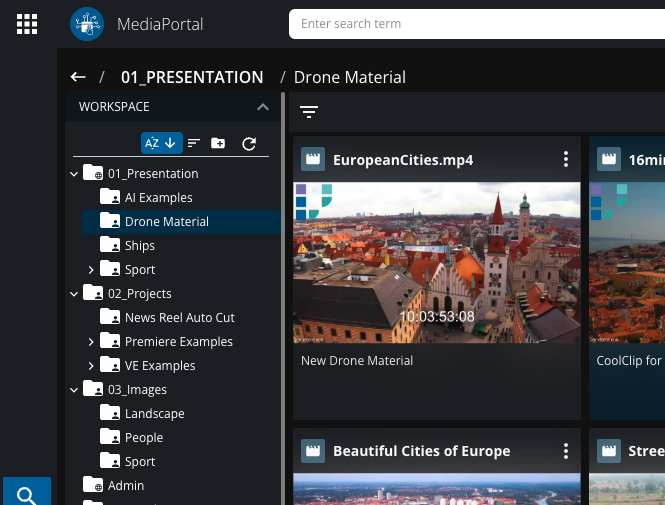
The Organized Workspaces feature enhances content organization by extending and refining the existing Workspace functionality. Key features include:
-
Unified Workspace View:
-
Folder icons provide visual cues:
-
Personal folders are represented by a person icon.
-
Folders shared by the user display a globe icon.
-
Folders shared with the user have no additional icons.
-
-
-
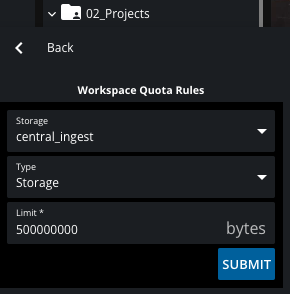
Quotas for Workspaces:
-
Administrators and media managers can set quotas using the VidiCore Quota feature, based on:
-
Storage consumption.
-
The number of items in a folder.
-
-
Quota statuses are visually represented:
-
Normal: No warnings, standard display.
-
Warning: Storage nearing capacity, indicated in orange.
-
Full: Maximum consumption reached, marked in red, and content cannot be added.
-
-
Configuration guidelines:
-
Use the VidiCore API to set quota rules.
-
Ensure only one quota rule is applied per workspace.
-
Confirm quotas are correctly displayed in the workspace UI.
-
-
-
Deletion Locks:
-
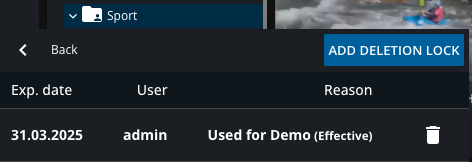
Users can enable deletion locks to prevent accidental deletion of folders and their contents.
-
Deletion locks:
-
Apply to all items within the workspace.
-
Can only be removed by the creator or an administrator.
-
Can be modified or removed only by the user who enabled them or an administrator.
-
-
-
Sorting Workspaces:
-
Workspaces can be sorted by:
-
Name.
-
The number of contained items.
-
-
These updates provide enhanced functionality, better organization, and improved safeguards, ensuring workspace content remains secure and manageable.