
The new Workflow Designer referenced here has been introduced with release 23.3.
After a fresh installation of VidiFlow, clicking on the edit button to a workflow will redirect you to the Workflow Designer page. With the introduction of a “new” Workflow Designer, it is possible to configure VidiFlow redirect to the “new” Workflow Designer when editing a workflow.
The new Workflow Designer should first be used extensively in a test environment before it is used productively. Individual features of the old Workflow Designer may not yet be available.
Steps
-
The following steps can be used for fresh and existing environment installation.
-
Go to PREPARED inventory to edit the file “10_vpms3.vidiflow.v2.yaml”.
-
Add
useNewWorkflowDesignerAsDefault: truebelowvidiflow-clients. The full modification is as follows.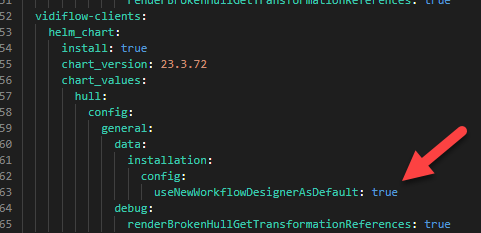
Example: Full Vidiflow Clients Configuration
-
Run the PREPARED installation, after it is completed, go into the VidiFlow portal.
-
Navigation to the “Workflow” tab, and click on the pencil button (edit).
-
You will be redirected to the new Workflow Designer.