
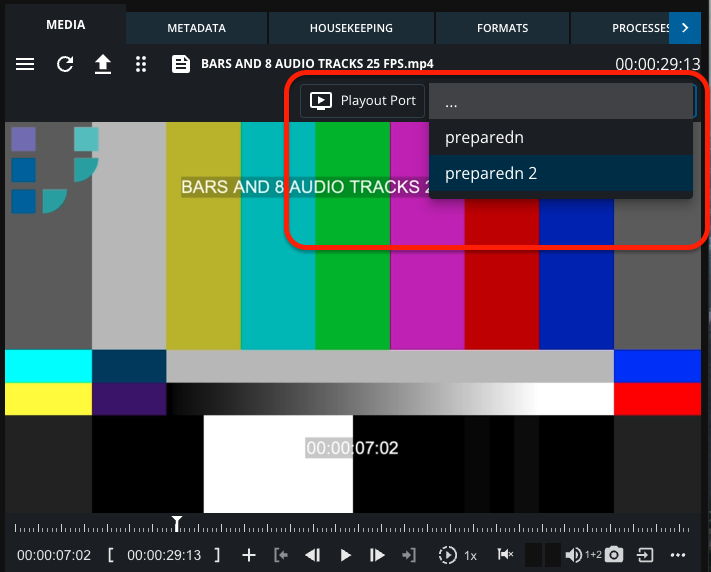
The HiRes Playout feature allows authorized users to control high-resolution video server playback directly from MediaPortal’s familiar player interface. Playback commands are sent in parallel to both the proxy video and the external video server.
Using HiRes Playout
Prerequisites
-
User must have appropriate elevated permissions to access HiRes Playout functionality.
-
The media item must have a valid file reference on the configured video server storage.
Workflow
-
Load an Item
-
Open MediaPortal and navigate to either the Preview Panel or Details View.
-
Load the media item you wish to play.
-
-
Select a Video Server
-
From the available list of configured video servers, select the desired video server for HiRes playout.
-
-
Validation
-
The system checks whether the selected media item has a corresponding file available on the selected video server’s storage.
-
-
Playback
-
If validation is successful, the player sends playback commands (e.g., play, pause, seek) in parallel:
-
Web-based proxy player for preview.
-
Video server playout port for high-resolution output.
-
-
-
Control
-
Users control both playout systems using the same unified controls within MediaPortal.
-
Notes
-
If the media file is not yet available on the video server storage, playback will only occur on the web-video proxy.
-
Ensure workflows are in place to transfer media to the appropriate storage locations for HiRes playout.
-
Additional Resources
-
Refer to the internal documentation for system-specific integration details. Player Config in MediaPortal | HiRes Playout