
With VidiEditor you can grab an image from a video file e.g. for graphics department, teaser production etc. . The image can be created from the high resolution video to get best quality depending on the backend workflow used for it (see Image Grabber [VE OG]).
Therefore the image grabbing is handled by a backend VidiFlow workflow, that needs to be configured by the system administrator using ConfigPortal. The grabbed image is stored on a central storage to make it accessible for further processing.
-
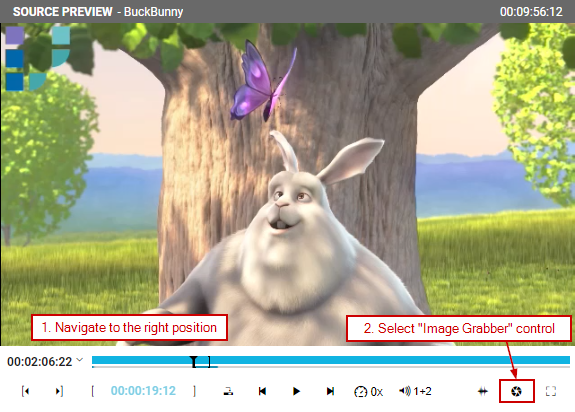
To grab an image you first need to navigate to the right position in the video, that shows the image you are interested in.
-
Now select the “Image Grabber” symbol from the player controls indicated by a camera icon.
-
VidiEditor will prompt a message like “image grabbing process initiated”. Now in the backend the workflow is processed and the image will be available in a predefined directory.
Please Note: This feature is only available for Enterprise installations including VidiFlow.