
Upgrading RabbitMQ to version 3.12.x involves more steps then the usual updates. You need to make sure that certain feature flags are enabled in the RabbitMQ dashboard. Here is a step-by-step guide on how to do that:
-
Check Feature Flags: Before upgrading, make sure that the following feature flags are enabled in the RabbitMQ dashboard.
-
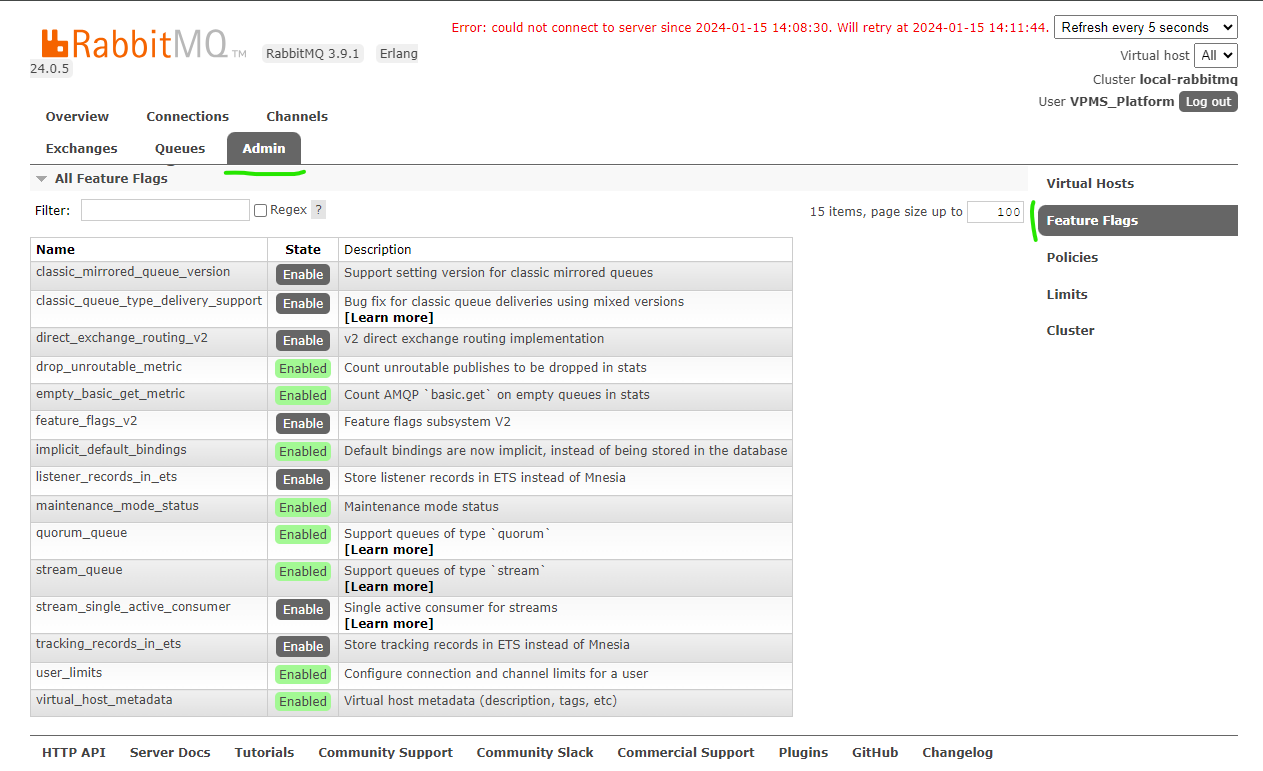
Enable Feature Flags: In the RabbitMQ dashboard, click on the
Admintab, and then click on theFeature Flagssub-tab. Make sure that the following flags are enabled:
-
classic_mirrored_queue_version
-
classic_queue_type_delivery_support
-
direct_exchange_routing_v2
-
feature_flags_v2
-
listener_records_in_ets
-
stream_single_active_consumer
-
tracking_records_in_ets
-
Upgrade RabbitMQ: After enabling the feature flags, you can proceed with the upgrade.
By following these steps, you can successfully upgrade RabbitMQ to version 3.12.x and ensure that your applications continue to work as expected.