
On default a VidiEditor timeline starts at timecode position 00:00:00:00 or on the default set in the application wide configuration (see Timeline Configuration Parameters) the timeline after project creation with default configuration looks as follows:

So the timeline and timeline player start at position 00:00:00:00 (or the configured default). This is also reflected in the timeline's ruler.
It might be necessary to change the start timecode for several reasons, for example to set a start timecode for a playout automation or a studio playout situation. This can be done while doing a right click on the timeline timecode field and choosing the “Change Start Timecode“ option.
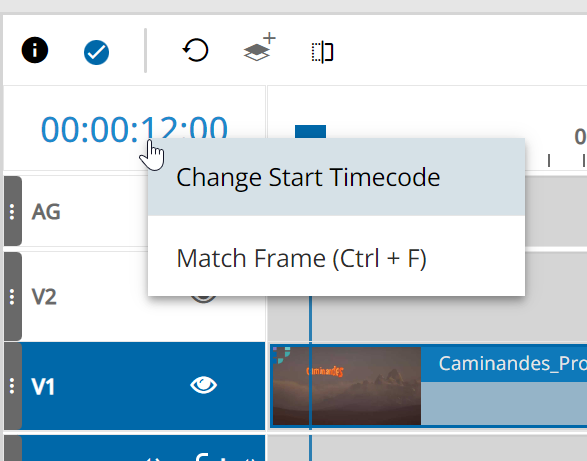
This opens a dialogue allowing to set any wanted timecode:
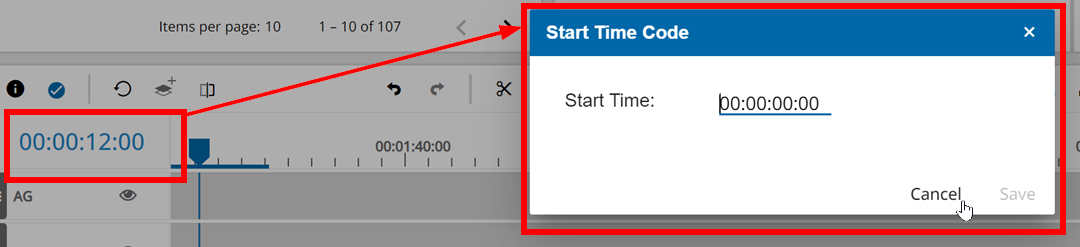
Doing so and click OK button will adjust following behaviors in the user interface:
-
The timelines start timecode will be set to the entered value
-
The timeline ruler will change based on the set offset timecode
-
The start timecode and timecode navigation in the timeline player will change
Following figure illustrates the affected areas:
Furthermore setting this offset might have an effect on publish while the publish process will create a new video file, it will adjust the start timecode also in the video file itself as long as the output format supports this option.